

A/B Testing Landing Pages: 15 Elements to Test First
Discover the 15 highest-impact landing page elements to A/B test first. Prioritize tests that drive real conversion lifts with data-backed guidance.

A/B Testing Landing Pages: 15 Elements to Test First
A/B testing landing pages is the single fastest way to increase revenue without spending another dollar on traffic. You already paid to get visitors there. The only question is whether your page converts them or loses them.
A/B testing landing pages is the practice of creating two or more variations of a landing page element — such as a headline, CTA, or layout — showing each version to a randomized segment of visitors, and measuring which variation produces a higher conversion rate with statistical confidence.
Most teams waste months testing the wrong things. They tweak button border-radius while their headline actively repels buyers. This guide ranks the 15 highest-impact elements in order so you test what actually moves the needle first.
Why Landing Pages Are the Highest-ROI Place to A/B Test
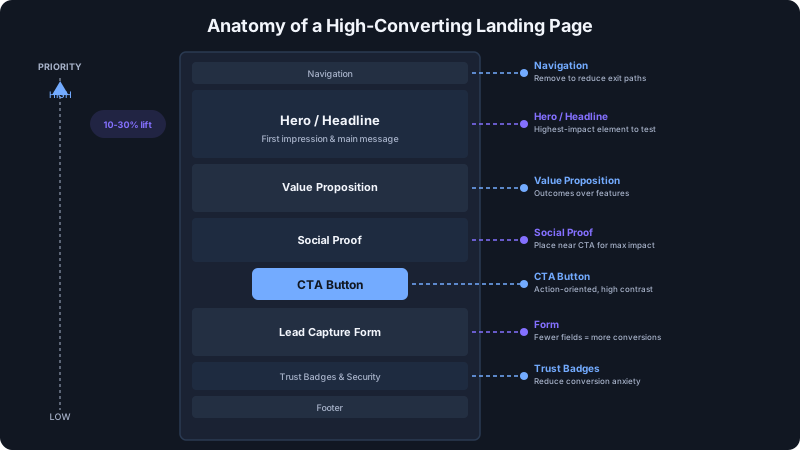
Landing pages sit at the sharpest point of your funnel. Every visitor who arrives has already clicked an ad, an email link, or a search result. They showed intent. Your landing page either captures that intent or squanders it.
Consider the math. If your landing page gets 10,000 visitors per month at a 3% conversion rate, that is 300 conversions. A 20% relative improvement pushes that to 360 conversions — 60 additional customers from the same traffic budget. At a $100 average order value, that is $6,000 per month from a single test.
Unlike homepage or blog optimizations, landing page tests produce clean data. There is typically one goal, one audience segment, and one traffic source. That clarity means you reach statistical significance faster and can trust your results.
Platforms like Keak make this even more efficient. The AI agent generates landing page variations, launches tests automatically, waits for statistical significance, and learns from results — so you get compounding gains without manual effort. Teams using this approach see an average 22.5% conversion rate increase in just two weeks.
The 15 Elements to Test (In Priority Order)
1. Headlines
Why it matters: Your headline is the first thing visitors read and the primary factor in whether they stay or bounce. Research from Nielsen Norman Group shows that 8 out of 10 people read the headline, but only 2 out of 10 read the rest. A weak headline means the rest of your page is invisible.
What to test:
- Length: Short and punchy (5-7 words) vs. detailed and specific (12-18 words)
- Specificity: "Grow Your Business" vs. "Add $12K in Monthly Revenue in 90 Days"
- Emotional vs. rational: "Stop Losing Sleep Over Cash Flow" vs. "Reduce Accounts Receivable by 47%"
- Question vs. statement: "Tired of Wasting Ad Spend?" vs. "Cut Wasted Ad Spend by Half"
Expected impact: Headlines consistently produce the largest conversion lifts — 10-30% improvement is common for a winning variation. For a deep dive, see our guide on how to A/B test headlines that convert.
2. Call-to-Action Button Text
Why it matters: The CTA button is the literal gateway to conversion. Generic text like "Submit" creates friction because it tells the visitor nothing about what happens next.
What to test:
- Action-oriented text: "Get My Free Quote" vs. "Submit"
- First person vs. second person: "Start My Trial" vs. "Start Your Trial"
- Benefit-driven: "See My Savings" vs. "Calculate Now"
- Urgency modifiers: "Claim Your Spot" vs. "Sign Up"
Expected impact: CTA text changes typically yield 5-15% conversion improvements. They are high-ROI because they take seconds to implement.
3. CTA Button Color and Size
Why it matters: The button needs to be the most visually prominent element on the page. If it blends into the design, visitors miss it. Contrast drives clicks.
What to test:
- High-contrast colors vs. on-brand colors
- Button size (larger buttons on mobile especially)
- Button shape (rounded vs. sharp corners)
- Adding whitespace around the button
Expected impact: Color and size changes alone drive 2-10% lifts, but the impact compounds when combined with better copy.
4. Hero Image or Video
Why it matters: Visuals communicate faster than text. The hero image sets the emotional tone and either builds trust or triggers skepticism in under one second.
What to test:
- Product screenshot vs. lifestyle photo vs. illustration
- Static image vs. short video (under 60 seconds)
- Image with people vs. without people
- Custom photography vs. stock imagery
Expected impact: Hero visual changes can produce 5-20% conversion swings, particularly when switching from stock photos to authentic product imagery or customer photos.
5. Above-the-Fold Layout
Why it matters: The above-the-fold area is your entire pitch for the 50-70% of visitors who never scroll. Every element in this zone fights for attention, and the layout determines what wins.
What to test:
- Single-column vs. two-column layout
- Left-aligned text vs. centered text
- CTA position (top-right, centered below headline, inline with form)
- Amount of content above the fold (minimal vs. dense)
Expected impact: Layout restructuring yields 10-25% improvements when the original layout buried critical elements below the fold.
6. Social Proof Placement
Why it matters: Social proof reduces perceived risk. Testimonials, customer logos, review counts, and case study snippets give visitors permission to trust you.
What to test:
- Testimonials above the fold vs. mid-page
- Customer logos near the headline vs. near the CTA
- Star ratings vs. written reviews
- Number of testimonials shown (1 vs. 3 vs. 5)
- Video testimonials vs. text testimonials
Expected impact: Adding or repositioning social proof drives 5-15% conversion improvements. Placing it directly adjacent to the CTA often performs best.
7. Form Length and Fields
Why it matters: Every additional form field adds friction. But fewer fields can also reduce lead quality. The right balance depends on your sales process.
What to test:
- Number of fields (3 vs. 5 vs. 7+)
- Required vs. optional field labels
- Single-step vs. multi-step forms
- Inline validation vs. submit-and-check
- Progressive profiling (ask for more data later)
Expected impact: Reducing form fields from 6 to 3 regularly produces 25-40% more submissions — though lead quality may shift, so track downstream metrics.
8. Value Proposition Copy
Why it matters: Your value proposition answers the visitor's core question: "Why should I choose you over every alternative, including doing nothing?" Weak value props produce weak conversions.
What to test:
- Feature-focused vs. outcome-focused copy
- Bullet points vs. paragraph format
- Specific metrics ("saves 4 hours/week") vs. qualitative claims ("saves time")
- Competitor comparison vs. standalone positioning
Expected impact: Rewriting value proposition copy around customer outcomes instead of product features typically lifts conversions by 8-20%.
9. Pricing Display
Why it matters: How you present pricing shapes perceived value. Anchoring, framing, and transparency all influence whether visitors see your price as fair or expensive.
What to test:
- Showing price vs. hiding it behind a CTA
- Monthly vs. annual pricing display
- Price anchoring (showing the "before" price)
- Per-unit pricing ("$3/day" vs. "$90/month")
- Free tier emphasis vs. premium tier emphasis
Expected impact: Pricing display optimizations deliver 5-15% conversion changes. The direction depends heavily on your product's price point and market.
10. Navigation (Show/Hide)
Why it matters: Navigation gives visitors an escape route. On a dedicated landing page, every link that is not your CTA is a potential leak in your funnel.
What to test:
- Full navigation vs. no navigation
- Simplified navigation (logo + CTA only) vs. full menu
- Sticky navigation vs. scroll-away navigation
- Footer links vs. no footer links
Expected impact: Removing navigation from landing pages increases conversions by 3-10% on average. This is one of the easiest and most reliable tests you can run.
11. Trust Badges and Security Indicators
Why it matters: Trust badges reduce anxiety at the moment of conversion, especially for e-commerce and SaaS signups where visitors share payment information or personal data.
What to test:
- Payment security badges (Norton, McAfee, SSL)
- Money-back guarantee badges
- Industry certifications and awards
- "As seen in" media logos
- Badge placement (near form vs. near CTA vs. footer)
Expected impact: Trust badges near the conversion point typically lift conversions by 3-8%, with larger effects on pages where payment information is collected.
12. Urgency and Scarcity Elements
Why it matters: Urgency compresses decision timelines. Without it, visitors default to "I will come back later" — and most never do. Studies show 97% of first-time visitors leave without converting.
What to test:
- Countdown timers (real deadline vs. evergreen)
- Limited availability messaging ("Only 3 spots left")
- Time-limited offers vs. always-available offers
- Urgency in CTA text vs. urgency as a separate element
Expected impact: Genuine urgency elements produce 5-15% conversion lifts. Manufactured urgency (fake countdown timers) may boost short-term numbers but erodes trust long-term.
13. Mobile Layout Variations
Why it matters: Mobile traffic now accounts for over 60% of web traffic globally, yet most landing pages are designed desktop-first. Mobile visitors have different behaviors, smaller screens, and less patience.
What to test:
- Stacked layout vs. collapsed accordion sections
- Tap-to-call CTA vs. form fill
- Thumb-friendly button placement
- Image size and loading speed on mobile
- Sticky mobile CTA bar vs. inline CTA
Expected impact: Mobile-specific optimizations often produce 10-25% conversion improvements on mobile segments, which can meaningfully shift your overall conversion rate.
14. Page Length (Short vs. Long-Form)
Why it matters: The right page length depends on your offer complexity and audience awareness. A simple free trial may need 500 words. A $10,000 B2B product may need 3,000.
What to test:
- Short page (single screen, minimal copy) vs. long-form (detailed case studies, FAQs, multiple proof points)
- Expandable sections vs. everything visible
- Multiple CTA placements on long pages vs. single CTA on short pages
Expected impact: Page length tests produce highly variable results — we have seen 30%+ improvements in both directions. The key is matching length to the complexity of the buying decision.
15. Exit-Intent Popups
Why it matters: Exit-intent popups capture visitors who are about to leave. Since these visitors would have been lost anyway, even a modest conversion rate on the popup is pure upside.
What to test:
- Discount offer vs. content offer (guide, checklist)
- Full-screen overlay vs. slide-in
- Popup copy and headline
- Timing (immediate exit intent vs. delayed)
- Popup on all pages vs. landing pages only
Expected impact: Exit-intent popups typically convert 2-5% of abandoning visitors. On high-traffic pages, that adds up quickly.
How to Prioritize: The ICE Framework
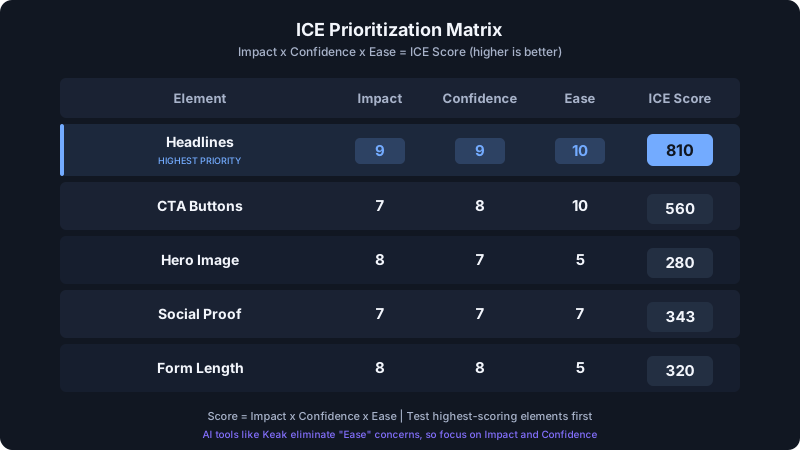
You cannot test all 15 elements simultaneously. Use the ICE framework to decide what to test first:
- Impact: How much will a win on this test move your conversion rate? (Score 1-10)
- Confidence: How confident are you, based on data and best practices, that this test will produce a winner? (Score 1-10)
- Ease: How quickly and easily can you implement this test? (Score 1-10)
Multiply the three scores and rank your tests by the total. Headlines almost always score highest because they have massive impact, high confidence (data backs this consistently), and are easy to implement.
Here is a sample prioritization:
| Element | Impact | Confidence | Ease | ICE Score |
|---|---|---|---|---|
| Headline | 9 | 9 | 10 | 810 |
| CTA button text | 7 | 8 | 10 | 560 |
| Above-the-fold layout | 8 | 7 | 6 | 336 |
| Social proof placement | 7 | 7 | 7 | 343 |
| Form length | 8 | 8 | 5 | 320 |
Tools like Keak eliminate most of the "Ease" concerns entirely. Because the AI generates variations and launches tests through a browser extension — no code changes required — even complex layout or copy tests become trivial to set up. This means you can focus your prioritization purely on Impact and Confidence.
Common Landing Page Testing Mistakes
Testing too many elements at once. If you change the headline, hero image, and CTA simultaneously, you cannot attribute the result to any single change. Test one element at a time unless you are running a proper multivariate test with sufficient traffic.
Ending tests too early. A test that has been running for two days with 200 visitors is not conclusive, even if one variation shows a 40% lift. You need statistical significance before declaring a winner. Keak's SPRT-based statistics engine handles this automatically, so you never have to guess when to call a test.
Ignoring mobile performance. Your desktop winner may be your mobile loser. Always segment results by device type before rolling out a winning variation site-wide.
Testing cosmetic changes instead of strategic ones. Changing your button from blue to green is a cosmetic test. Changing your headline from feature-focused to outcome-focused is a strategic test. Strategic tests produce bigger wins.
Not documenting results. Every test teaches you something about your audience. If you do not record what you tested, what won, and why you think it won, you lose that learning. Build a testing log and review it quarterly.
Copying competitors instead of testing. What works for a competitor's audience may not work for yours. Use competitor pages for inspiration, but let your own data decide what stays on your page.
Start Testing Today
The gap between a mediocre landing page and an optimized one is often 2-5x in conversion rate. That is the difference between a profitable campaign and a money-losing one.
Start with headlines. They are the highest-impact, easiest-to-test element on this list. Then work down through CTAs, layout, and social proof. Each winning test compounds on the last.
For a broader view of conversion rate optimization, pair your landing page tests with site-wide improvements across your entire funnel.
FAQ
How long should I run an A/B test on a landing page?
Run the test until you reach statistical significance, which typically requires at least 100 conversions per variation. For most landing pages, this means 1-4 weeks depending on traffic volume. Never end a test early just because one variation looks like it is winning — early results are unreliable.
How much traffic do I need to A/B test a landing page?
A reasonable minimum is 1,000 visitors per variation per week. With lower traffic, tests take longer to reach significance, but they are still worth running. If your landing page gets fewer than 500 visitors per month, focus on driving more traffic before investing in split testing.
Should I test one element at a time or multiple elements?
Test one element at a time (A/B testing) unless you have very high traffic volumes that support multivariate testing. Single-element tests give you clean, attributable results. Once you understand which elements matter most for your audience, you can run more complex tests.
What is a good conversion rate improvement from A/B testing landing pages?
A 10-20% relative improvement from a single winning test is solid. Some headline or layout tests produce 30-50% lifts, but those are less common. The real power is in compounding — five tests that each improve conversions by 10% produce a 61% cumulative improvement.
Can I A/B test landing pages without coding?
Yes. Tools like Keak use a browser extension that overlays changes on your existing page — no tracking scripts and no code changes required. It works on Shopify, Webflow, WordPress, Framer, Squarespace, and any other website platform. You can go from idea to live test in minutes.