

Automated Website Optimization: The Complete Guide
Learn how automated website optimization uses AI to run continuous A/B tests, improve conversions, and eliminate manual testing bottlenecks. Complete guide for 2026.

Automated Website Optimization: The Complete Guide
Automated website optimization is replacing the manual, slow, resource-heavy testing workflows that have held back conversion teams for over a decade. Instead of spending weeks planning a single A/B test, the best teams in 2026 are deploying AI agents that generate variations, run experiments, and implement winners -- continuously and without human intervention. This guide covers what automated optimization is, how it works, and how to implement it in your organization.
Automated website optimization is the use of AI and machine learning to continuously test, evaluate, and improve website elements -- such as headlines, calls-to-action, images, and layouts -- without requiring manual hypothesis creation, variation design, or test management, resulting in faster iteration cycles and compounding conversion gains.
If your team is still manually creating every test variation and waiting weeks for results, you're leaving money on the table. Here's how to fix that.
What Is Automated Website Optimization?
Automated website optimization is the practice of using software -- typically powered by AI or machine learning -- to handle the end-to-end process of improving website performance. This includes generating test ideas, creating variations, allocating traffic, measuring results, and deciding winners.
Traditional optimization requires a human at every step: a strategist to form hypotheses, a designer to create mockups, a developer to build variations, an analyst to interpret results, and a project manager to keep it all moving. The result is that most companies run fewer than 5 tests per month, even though research from VWO shows that companies running 10+ monthly tests see 2-3x better conversion outcomes.
Automated optimization removes the human bottleneck. An AI agent handles the creative, analytical, and operational work, while humans provide strategic direction and guardrails.
This isn't theoretical. Platforms operating in this space are already testing billions of impressions. The shift from manual to automated optimization is comparable to the shift from manual to programmatic ad buying -- it's not a question of if, but when.
Manual vs. Automated Optimization
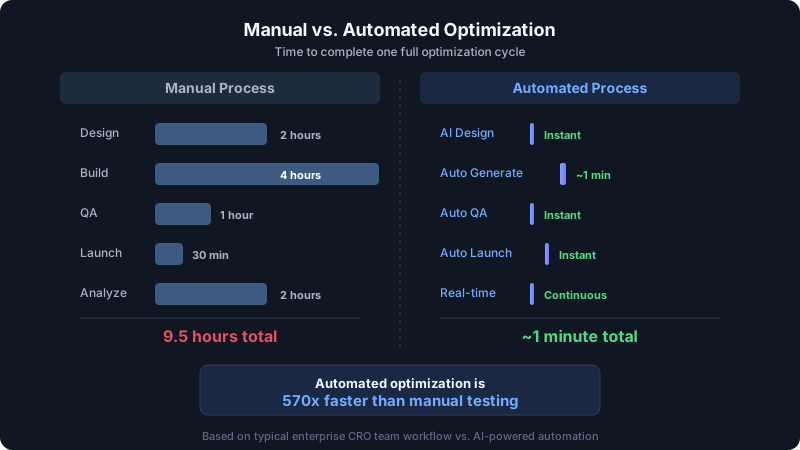
To understand why automation matters, compare the two approaches side by side:
| Dimension | Manual Optimization | Automated Optimization |
|---|---|---|
| Test velocity | 2-5 tests/month | 20-100+ tests/month |
| Time to launch a test | 1-4 weeks | Minutes to hours |
| Variation creation | Designer + developer required | AI-generated automatically |
| Hypothesis source | Human intuition + research | Data patterns + ML models |
| Statistical analysis | Manual interpretation | Real-time automated analysis |
| Traffic allocation | Fixed 50/50 split | Dynamic, optimized allocation |
| Team size required | 3-5 specialists | 1 person (or zero with Auto Pilot) |
| Cost per test | $500-$5,000+ | Near zero marginal cost |
| Learning transfer | Tribal knowledge, spreadsheets | ML model trained on all results |
| Operating hours | Business hours only | 24/7 continuous |
The difference in test velocity alone is transformative. CRO outcomes compound with volume. If each winning test lifts conversions by 2-5%, running 10x more tests means reaching a 20-50% cumulative lift in months rather than years.
Manual optimization still has a role -- particularly for complex, high-stakes tests that require deep strategic thinking (like pricing page experiments or major brand repositioning). But for the vast majority of website elements, automation delivers better results faster.
How Automated Optimization Works
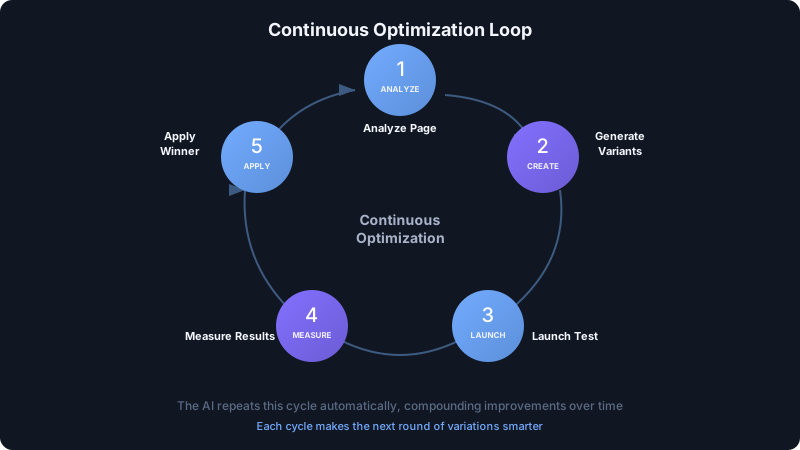
The best automated optimization platforms operate as a continuous improvement loop. Here's how the cycle works, step by step.
Step 1: Baseline Analysis
The system analyzes your current website -- its content, structure, performance metrics, and conversion data. It identifies which pages and elements have the highest optimization potential based on traffic volume, current conversion rates, and historical patterns.
Step 2: AI Variation Generation
This is where automation diverges most sharply from manual processes. Instead of waiting for a human to design variations, an AI engine generates multiple alternatives for headlines, CTAs, images, layouts, and other elements.
Modern AI models are trained on thousands of successful A/B tests across industries, so the variations aren't random -- they're informed by patterns that have worked before. Keak's V3 engine, for example, is an ML model trained on data from over 1.37 million variations created across its platform.
Step 3: Automated Test Launch
The system launches the A/B test without manual intervention. It handles traffic splitting, ensures proper randomization, and sets up the statistical framework for evaluation.
This step alone saves days of work. In a manual workflow, launching a test typically involves QA reviews, staging environments, stakeholder approvals, and deployment coordination. An automated system handles all of this in the background.
Step 4: Real-Time Statistical Analysis
As data flows in, the system continuously evaluates results using rigorous statistical methods. The best platforms use Sequential Probability Ratio Testing (SPRT) rather than traditional fixed-horizon methods.
SPRT allows the system to reach conclusions as soon as statistically valid -- not after an arbitrary waiting period. This means winning variations get implemented faster, and losing variations stop wasting traffic sooner. According to research published in the Journal of the Royal Statistical Society, SPRT can reach valid conclusions with 20-50% less data than fixed-sample methods.
Step 5: Winner Implementation and Learning
When a variation wins, the system implements it automatically. More importantly, it feeds the result back into its ML model. This creates a compounding knowledge advantage -- every test makes the next round of generated variations smarter and more likely to win.
Then the cycle repeats. New variations are generated for the winning element (or the system moves to other elements), and the continuous improvement loop keeps running.
This is fundamentally different from manual CRO, where knowledge degrades as team members leave and institutional memory fades. An automated system's knowledge only grows.
Types of Automation: Rule-Based vs. AI-Powered
Not all automation is created equal. There are two broad categories, and the distinction matters.
Rule-Based Automation
Rule-based systems follow predefined logic: "If bounce rate exceeds 60%, show variation B." "If the visitor is from the US, display pricing in USD." "On mobile devices, hide the sidebar."
Pros:
- Predictable behavior
- Easy to understand and audit
- Good for simple personalization
Cons:
- Limited to scenarios you can anticipate
- Can't discover novel improvements
- Doesn't learn or adapt over time
- Requires manual rule creation and maintenance
Rule-based automation is useful for basic personalization and targeting, but it doesn't actually optimize. It just executes decisions that a human already made.
AI-Powered Automation
AI-powered systems generate new ideas, test them, learn from results, and improve over time. They don't just follow rules -- they discover what works through experimentation.
Pros:
- Discovers improvements humans wouldn't think of
- Scales without proportional human effort
- Learns and improves continuously
- Handles complexity (multivariate, multi-page, multi-segment)
Cons:
- Requires trust in the AI's decision-making
- Less transparent than rule-based logic (though good platforms provide full visibility into what's being tested)
- Needs sufficient traffic for statistical validity
The market is moving decisively toward AI-powered automation. A 2025 Gartner report predicted that by 2027, 80% of digital experience optimization will be AI-driven. Early adopters are already seeing results: platforms like Keak report a 73%+ test win rate across their user base -- significantly higher than the industry average of 20-30% for manually designed tests.
What Can Be Automated
Automated optimization applies to virtually every user-facing element on your website. Here are the highest-impact areas.
Headlines and Copy
Headlines are the highest-leverage element on any page. They determine whether visitors keep reading or bounce. AI excels at generating headline variations because language patterns are well-suited to machine learning.
What to automate: H1 headlines, subheadlines, product descriptions, benefit statements, and value propositions.
Typical impact: Well-optimized headlines can lift conversions by 10-30%. At scale, testing dozens of headline variations per page means finding the top performer much faster than testing 2-3 manually.
Calls-to-Action
CTA optimization is a perfect automation candidate because the variations are relatively simple (copy, color, placement, size) but the combinatorial space is large. Testing "Start Free Trial" vs. "Get Started" vs. "Try It Free" vs. "See How It Works" across different button colors and placements creates dozens of combinations.
What to automate: Button text, button styling, placement, surrounding copy, and urgency elements.
Typical impact: CTA optimization lifts click-through rates by 5-25% depending on the starting point. Unbounce data shows that the top-performing CTA copy in any category typically outperforms the median by over 200%.
Page Layouts
Layout changes -- reordering sections, adjusting visual hierarchy, modifying spacing and structure -- can dramatically impact how visitors process information and make decisions.
What to automate: Section ordering, content block arrangement, sidebar vs. full-width layouts, and visual hierarchy adjustments.
Typical impact: Layout optimization typically drives 5-15% conversion improvements, with larger gains on pages that haven't been previously optimized.
Images and Visual Elements
The right hero image or product photo can make or break a page. AI systems can test different image styles (lifestyle vs. product, with-people vs. without), crops, and placements at a speed that's impossible manually.
What to automate: Hero images, product photos, background images, icon styles, and video vs. static content.
Typical impact: Image changes drive 3-20% conversion differences depending on the page type and product category.
Pricing Pages
Pricing pages have outsized revenue impact, making them a high-value automation target. Elements to test include plan naming, feature ordering, price anchoring, highlighted/recommended plans, and CTA copy.
What to automate: Plan names, feature list ordering, visual emphasis on specific plans, trial vs. demo CTAs, and pricing presentation (monthly vs. annual toggle behavior).
Typical impact: Pricing page optimization can drive 10-40% revenue improvements. Even small lifts compound across every customer who passes through the page.
For a deeper exploration of which elements to test, see our guide on A/B testing landing page elements.
Getting Started: Choosing the Right Automation Tool
Not all automated optimization tools are equal. Here's what to evaluate when choosing a platform.
Integration Complexity
The biggest barrier to adoption is implementation friction. If a tool requires installing tracking scripts, modifying your codebase, or involving your engineering team for every test, adoption will stall.
Look for: Tools that work without code changes. Keak, for example, operates entirely through a Chrome browser extension -- no tracking scripts, no code modifications. Its pixel is approximately 34KB gzipped, loads asynchronously, and adds less than 10ms to page load. It works on Shopify, Webflow, WordPress, Framer, Squarespace, and essentially any website.
AI Capabilities
There's a wide spectrum between "AI-assisted" (suggesting test ideas that humans still have to implement) and "AI-autonomous" (generating, running, and learning from tests independently).
Look for: Platforms that handle the full loop -- generation, testing, analysis, and learning. Ask specifically: "Can this run without any human input?" If the answer is yes, you're looking at true automation.
Statistical Rigor
Bad statistics lead to bad decisions. Some tools let you "call" a winner based on insufficient data, leading to false positives and implementing changes that don't actually help.
Look for: SPRT-based or Bayesian statistical engines that control for false positives while allowing efficient early stopping. Avoid tools that rely solely on simple p-value thresholds without multiple comparison corrections.
Pricing and Scalability
Automated optimization should reduce costs, not increase them. Legacy platforms charge thousands per month before you run a single test.
Look for: Usage-based pricing aligned with your traffic. Free tiers for validation (Keak offers 10,000 free impressions with unlimited tests). Starter plans under $50/month. No per-seat fees that penalize growing teams.
Learning and Compounding
The best automated optimization platforms get smarter over time. Each test result trains the model, so future variations are more likely to win.
Look for: Platforms that explicitly describe their learning mechanism. Ask: "How does my test data improve future variations?" If the vendor can't answer this clearly, their "AI" may be a marketing label rather than a genuine capability.
Case Examples: Results from Automated Testing
The data from automated optimization programs tells a clear story. Here are representative outcomes from AI-powered testing at scale.
E-Commerce: Headline and CTA Optimization
An e-commerce brand running automated headline and CTA tests across their product pages saw a 22% increase in add-to-cart rate within the first three weeks. The AI generated 47 headline variations and 23 CTA variations, testing them across 180,000 visitors. The winning combination was a headline structure the team had never considered -- leading with a specific use case rather than a product feature.
SaaS: Landing Page Optimization
A B2B SaaS company deployed automated optimization on their primary landing page. Over 6 weeks, the system ran 31 tests across headlines, hero images, social proof placement, and CTA copy. Conversion rate improved from 3.2% to 4.8% -- a 50% lift. The team estimated this would have taken 8-10 months to achieve through manual testing at their previous velocity of 3-4 tests per month.
Lead Generation: Form and Layout Testing
A financial services company automated testing on their lead capture pages. The system tested form field count, layout variations, trust badge placement, and headline copy. Cost per lead decreased by 34% as conversion rate improvements meant the same ad spend produced more leads.
Aggregate Platform Data
Across all users, automated testing platforms are producing results that significantly outperform manual benchmarks. Keak's platform data shows an average 22.5% conversion rate increase within 2 weeks across its user base, with over 2.1 billion impressions tested and 1.4 million weekly users participating in experiments. The 73%+ win rate across tests suggests that AI-generated variations are substantially better than random or purely human-generated alternatives.
These results align with broader industry data. A McKinsey study found that companies using AI for marketing optimization see 10-30% improvements in key performance metrics compared to those relying on traditional approaches.
The Future of Website Optimization
The trajectory of automated website optimization points toward several emerging trends.
Fully Autonomous Optimization
Today's automated tools still require some human setup -- choosing which pages to optimize, setting guardrails, approving significant changes. The next generation will operate with near-complete autonomy, continuously optimizing every customer-facing page without any manual configuration.
We're already seeing this with features like Keak's Auto Pilot mode, which runs fully automated testing without user intervention. As AI models improve and trust in automated decision-making grows, the default will shift from "human-led, AI-assisted" to "AI-led, human-supervised."
Cross-Channel Optimization
Current tools optimize individual pages or elements. Future platforms will optimize across the entire customer journey -- from ad copy to landing page to checkout to post-purchase email. The AI will understand that a headline change on the landing page affects downstream conversion at checkout and optimize for total journey revenue rather than single-page metrics.
Real-Time Personalization at Scale
The boundary between A/B testing and personalization is dissolving. Future automated optimization platforms won't just find one winning variation -- they'll serve different winning variations to different visitor segments in real time. Every visitor gets the version of your site most likely to convert them specifically.
Generative Content Optimization
As generative AI models improve, automated optimization will extend beyond testing pre-defined element types. AI will generate entirely new page sections, restructure content flows, and create novel visual designs -- all tested and validated automatically.
Privacy-First Optimization
With third-party cookies deprecated and privacy regulations tightening, optimization tools need to work with less individual-level data. Automated platforms that use aggregate statistical methods (like SPRT) and avoid persistent user tracking are better positioned for this privacy-first future. Lightweight, cookieless approaches -- like browser extensions that modify the rendered page without installing tracking scripts -- represent the direction the industry is heading.
For more on AI's role in conversion optimization, read our guide on how AI is changing CRO.
Building Your Automated Optimization Stack
Here's a practical roadmap for implementing automated website optimization in your organization.
Phase 1: Foundation (Week 1-2)
- Audit your current state. Document your conversion rates by page, traffic source, and device. Identify your highest-traffic, lowest-converting pages -- these are your automation targets.
- Choose your platform. Based on the evaluation criteria above, select an automated optimization tool. Start with a free tier to validate the approach before committing budget.
- Set guardrails. Define what elements the AI can and cannot change. Most teams start by automating headline and CTA testing while keeping layout and imagery under manual control, then expand as they build confidence.
Phase 2: Launch (Week 3-4)
- Start with your highest-impact page. Deploy automated testing on your primary landing page or top product page. This gives you the fastest path to measurable results.
- Monitor initial results. Watch the first few test cycles closely. Verify that variations look reasonable and that the statistical analysis is tracking correctly.
- Share early wins. As soon as you have a winning test, share the results with stakeholders. Nothing builds organizational buy-in faster than real revenue data.
Phase 3: Scale (Month 2-3)
- Expand to more pages. Roll automated testing across product pages, category pages, pricing pages, and key conversion funnels.
- Increase autonomy. If your initial guardrails were conservative, loosen them. Allow the AI to test images, layouts, and more complex elements.
- Integrate with your analytics stack. Connect automated optimization data with your analytics platform to see the full picture -- not just conversion rate lifts, but downstream revenue impact.
Phase 4: Optimize the Optimizer (Month 4+)
- Review the learning data. What patterns has the AI discovered? Which types of changes consistently win for your audience? Use these insights to inform broader marketing and product decisions.
- Benchmark against manual testing. Compare the velocity, win rate, and cumulative lift of your automated program against your previous manual approach. This data justifies continued investment.
- Explore advanced features. Multi-page testing, audience segmentation, cross-device optimization, and integration with ad platforms.
For a comprehensive foundation in CRO strategy, see our conversion rate optimization guide.
FAQ
What is the difference between automated website optimization and traditional A/B testing?
Traditional A/B testing requires humans at every step: forming hypotheses, designing variations, launching tests, analyzing results, and deciding next steps. Automated website optimization uses AI to handle all of these steps, from generating variations to running tests to learning from results. The key difference is velocity and scalability -- automated systems can run 10-50x more tests than manual teams, and they improve over time as the AI learns what works for your specific audience.
Will automated optimization work on my website platform?
Most modern automated optimization tools are platform-agnostic. If your website runs on Shopify, Webflow, WordPress, Framer, Squarespace, or any custom-built platform, you can likely use automated testing. The key requirement is that the tool can modify frontend elements without requiring changes to your codebase. Browser extension-based tools like Keak work on virtually any website because they operate at the rendering layer, not the code layer.
How much traffic do I need for automated website optimization?
You need enough traffic to reach statistical significance on your tests. For most scenarios, that means at least 5,000-10,000 monthly visitors on the pages you want to optimize. Higher traffic means faster test cycles and the ability to detect smaller improvements. If your traffic is below this threshold, focus on optimizing fewer pages and testing larger changes (headline rewrites rather than word swaps) to ensure your tests reach significance within a reasonable timeframe.
Is automated optimization safe? Can the AI break my website?
Reputable automated optimization platforms include safeguards to prevent negative outcomes. These typically include: automatic rollback if a variation performs significantly worse than the control, guardrails that limit what the AI can change, and real-time monitoring. The statistical engines ensure that changes are only implemented when there's strong evidence of improvement. That said, always start with a limited scope (one page, text-only changes) and expand as you build confidence in the platform.
How quickly can I expect to see results from automated website optimization?
Results depend on your traffic volume and the current state of your website. Sites that have never been optimized typically see the largest and fastest gains because there's more low-hanging fruit. Platforms report measurable improvements within 1-3 weeks for sites with sufficient traffic. Keak's data shows an average 22.5% conversion rate increase within 2 weeks across its user base. However, the real value is in the compounding effect -- continuous testing over months produces cumulative improvements that far exceed any single test result.