

Best A/B Testing Tools for Small Businesses in 2026
Compare the 7 best A/B testing tools for small businesses in 2026. Free and affordable options ranked by ease of use, pricing, and results for lean teams.

Best A/B Testing Tools for Small Businesses in 2026
The best A/B testing tools for small businesses are the ones you actually use — affordable, simple to set up, and capable of delivering measurable results without a dedicated optimization team. Most small businesses skip A/B testing entirely because the tools built for enterprise teams are too expensive, too complex, or both. That's a mistake worth fixing.
A/B testing tool for small business (definition): A website experimentation platform designed for lean teams and limited budgets, enabling business owners to test variations of headlines, calls-to-action, images, and layouts to increase conversions — without requiring developers, data scientists, or enterprise-level spending.
Here's the reality: businesses that test their websites convert more visitors into customers. A study by Invesp found that companies using A/B testing see an average conversion lift of 49% on tested pages. For a small business spending money on ads, SEO, or social media to drive traffic, failing to optimize the pages that traffic lands on is like pouring water into a leaky bucket.
This guide ranks the seven best affordable A/B testing tools available in 2026, with honest assessments of pricing, ease of use, and what each tool actually delivers for small business owners and solo marketers.
Why Small Businesses Need A/B Testing
The ROI Argument
Small businesses typically operate with tight margins and limited marketing budgets. Every dollar spent on ads, content, or social media drives visitors to your website — but the average website converts only 2-3% of visitors. A/B testing is how you increase that number without spending more on traffic.
Consider the math: if your website gets 5,000 visitors per month and converts at 2%, that's 100 leads or sales. A well-run A/B testing program that lifts conversion rates by 20% turns those same 5,000 visitors into 120 conversions. That's 240 additional conversions per year from the same traffic — no extra ad spend required.
Keak users, for example, see an average 22.5% conversion rate increase within 2 weeks. For a small business, that kind of lift can mean the difference between a profitable quarter and a flat one.
The "I Don't Have Time" Problem
The real barrier for small businesses isn't understanding that A/B testing works — it's finding the time and expertise to do it. Traditional A/B testing requires you to:
- Come up with a hypothesis
- Design variant pages or elements
- Set up the test in a tool
- Wait for statistical significance
- Analyze results
- Implement the winner
- Repeat
That's a lot of steps for a business owner who's also handling sales, customer service, and operations. The best tools for small businesses automate most or all of this process, which is why AI-powered platforms have become the default choice for lean teams in 2026.
What to Look for in a Small Business A/B Testing Tool
Not all A/B testing tools are built for small businesses. Here's what to prioritize:
Budget-Friendly Pricing
Enterprise tools like Optimizely and AB Tasty start at thousands per month. Small businesses need tools that either offer free plans or start under $50/month. Watch out for tools that advertise low prices but charge per seat, per feature, or per page tested.
No-Code Setup
If you need a developer to install and run your A/B testing tool, it's not built for small businesses. Look for tools that work through browser extensions, one-click installs, or simple tag manager setups. You should be running your first test within minutes, not weeks.
Ease of Use
You shouldn't need a statistics degree to run A/B tests. The tool should handle sample size calculations, statistical significance, and result interpretation for you. Bonus points if it also generates the test variations.
Automation
Manual test creation and management doesn't scale for a one-person marketing team. Tools with AI-generated variations and autonomous testing save hours of work per week and consistently outperform manually created tests.
CMS Compatibility
Your tool needs to work with your website platform. Whether you're on Shopify, WordPress, Webflow, Squarespace, Framer, or a custom build, compatibility shouldn't be an issue.
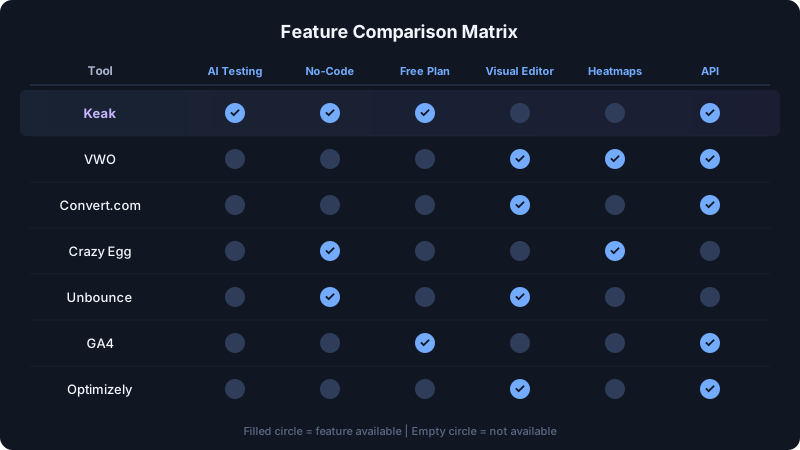
The 7 Best A/B Testing Tools for Small Businesses in 2026
1. Keak — Best Overall for Small Businesses
Keak is an AI-powered A/B testing platform that was purpose-built for the teams that enterprise tools ignore: small businesses, solo marketers, and founders who want results without becoming optimization experts.
What sets Keak apart is its fully autonomous approach. The AI agent generates website variations — headlines, CTAs, images, layouts — launches A/B tests automatically, waits for statistical significance using an SPRT-based statistics engine, learns from results, and repeats. You don't create variations. You don't configure tests. You don't interpret data. The AI does it all.
Setup: Install the Chrome browser extension. That's it. No tracking scripts, no code changes. Works on Shopify, Webflow, WordPress, Framer, Squarespace, and any website. Most users are testing within 2 minutes.
Key stats: 73%+ test win rate across the platform, with 2.1B+ impressions tested and 1.37M+ variations created by the V3 engine — a machine learning model trained on thousands of successful A/B tests.
Pricing:
- Free: Build and preview 25 variants, 3 image variants on 1 domain. No card required. Tests don't serve traffic until you add a card.
- Pay-as-you-go: $0.005 per impression once you add a card. Variants, images, and videos become unlimited. No subscription, no seats, no lock-in.
- Enterprise: Custom volume discounts, dedicated CRO support, API access, and commercial SLAs.
Why it's #1 for small businesses: The free tier is genuinely usable, not a feature-stripped teaser, and the metered model means a small business running 10k impressions a month pays $50, while a slower month costs almost nothing. The Auto Pilot mode means you don't need to dedicate time to testing. The pixel is ~34KB gzipped and loads async within 10ms of baseline, so it won't slow down your site. For small businesses that want AI-driven testing without the learning curve, Keak is the clear choice.
Pros:
- Free tier with no credit card required
- Pay only for the impressions you actually serve, with no subscription
- Fully autonomous, with no manual test creation
- 2-minute setup via Chrome extension
- No performance impact on your website
- Works on every major CMS
Cons:
- Focused on front-end website testing (no server-side experiments)
- Less suited for teams that want granular manual control over every test parameter
2. VWO — Best for Teams That Want Heatmaps Too
VWO (Visual Website Optimizer) is one of the oldest A/B testing platforms, and its visual editor remains one of the best. For small businesses that want testing plus basic user research — heatmaps, session recordings, on-page surveys — VWO bundles it together.
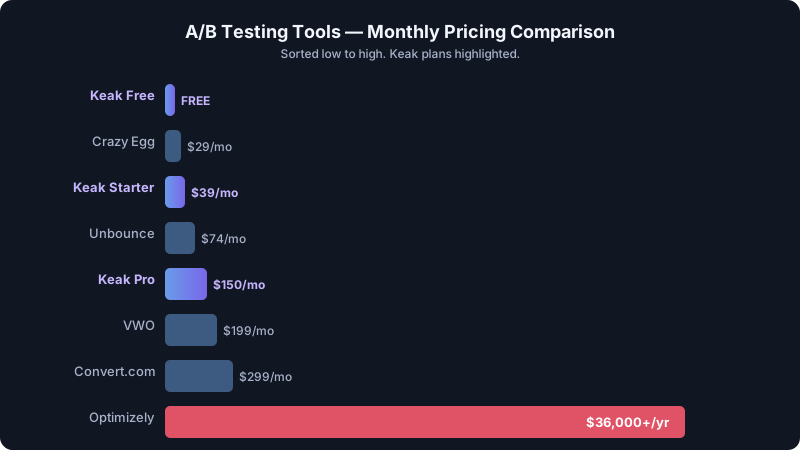
Pricing: Starts at $199/mo for the testing module. Full suite pricing increases from there. A free trial is available, but there's no permanent free plan.
Pros:
- Polished visual editor for creating test variants
- Heatmaps and session recordings included
- Mature platform with extensive documentation and support
Cons:
- $199/mo starting price is steep for most small businesses
- No AI-generated variations — you create everything manually
- Setup is more involved than lightweight alternatives
- Can be complex for non-technical users
Best for: Small businesses with $200+/mo to spend that want testing and user research combined. If budget is tight, look elsewhere.
3. Convert.com — Best for Privacy-Conscious Businesses
Convert.com has built a reputation as the privacy-first A/B testing platform. It's GDPR, CCPA, and HIPAA compliant with cookieless tracking options — relevant for small businesses in regulated industries or those serving European customers.
Pricing: Starts at $299/mo for 50,000 visitors. 15-day free trial available. No permanent free plan.
Pros:
- Best-in-class privacy compliance out of the box
- Clean visual editor
- Good GA4 and Shopify integrations
- Responsive customer support
Cons:
- $299/mo is a significant commitment for small businesses
- No AI-powered test generation
- Feature set is narrower than full-suite competitors
- Pricing scales with visitor count, which can get expensive quickly
Best for: Small businesses in healthcare, finance, legal, or any industry with strict data privacy requirements.
4. Crazy Egg — Best for Visual Insights on a Budget
Crazy Egg started as a heatmap tool and has since added A/B testing to its feature set. It's simple, affordable, and visual-first — making it a decent option for small businesses that want basic testing alongside scroll maps and click tracking.
Pricing: Starts at $29/mo (Basic plan). 30-day free trial available.
Pros:
- Affordable starting price at $29/mo
- Intuitive heatmaps and scroll maps
- Simple A/B testing setup
- Easy to understand for beginners
Cons:
- A/B testing features are basic compared to dedicated platforms
- No AI-generated variations
- Limited statistical depth — less rigorous than specialized tools
- Not built for high-volume testing programs
- Traffic limits are restrictive on lower plans
Best for: Small businesses that primarily want heatmaps and visual analytics, with basic A/B testing as a bonus. Not ideal if testing is your primary goal.
5. Unbounce — Best for Landing Page Testing
Unbounce is a landing page builder with built-in A/B testing. If your small business runs paid ad campaigns and needs to test dedicated landing pages (not your main website), Unbounce combines page building and testing in one tool.
Pricing: Starts at $74/mo (Launch plan). 14-day free trial available.
Pros:
- Drag-and-drop landing page builder
- AI-powered Smart Traffic feature that routes visitors to the best-performing variant
- Strong template library
- Built for conversion-focused landing pages
Cons:
- Only tests landing pages built within Unbounce — doesn't test your existing website
- $74/mo is on the higher side for basic landing page needs
- Not a general-purpose A/B testing tool
- Conversion limits on lower plans can be restrictive
Best for: Small businesses running Google Ads or Facebook Ads that need dedicated, tested landing pages. Not suitable for testing your main website or product pages.
6. Google Optimize Legacy Alternatives (GA4 Built-In)
With Google Optimize sunset in September 2023, some small businesses hoped Google Analytics 4 would absorb its testing features. As of 2026, GA4 offers extremely limited experimentation capabilities — primarily personalization through Google Ads integrations and basic audience experiments.
For a comprehensive breakdown of where the market has moved, see our guide to Google Optimize alternatives.
Pricing: Free (as part of GA4).
Pros:
- Free if you already use GA4
- Tight integration with Google Ads experiments
- No additional tool to install
Cons:
- Not a real A/B testing tool — severely limited compared to what Optimize offered
- No visual editor for creating variants
- Requires Google Ads for most experimentation features
- No AI-generated variations
- Cannot test arbitrary website elements
Best for: Only if you exclusively need to test Google Ads landing page variants and already use GA4. For any other use case, a dedicated tool is necessary.
7. Optimizely — Best for Growing Businesses Ready to Scale
Optimizely is the enterprise standard for experimentation, and it's included here for small businesses that are growing fast and anticipate needing enterprise-grade testing within the next year. It's not affordable for most small businesses today, but if you're venture-backed or scaling rapidly, it's worth understanding. For a detailed comparison, check our Keak vs. Optimizely breakdown.
Pricing: Custom quotes only. Typically $36,000-$150,000+/year. No free plan.
Pros:
- Industry-leading statistical engine
- Full feature flagging and server-side testing
- Massive integration ecosystem
- Scales to billions of impressions
Cons:
- Pricing is prohibitive for actual small businesses
- Requires developer resources for implementation
- Long implementation and onboarding timeline
- Contract commitments (typically annual)
Best for: Small businesses that are no longer "small" — high-growth companies with $5M+ revenue that need the testing infrastructure to match their scale.
Pricing Comparison: A/B Testing Tools for Small Businesses
| Tool | Free Plan | Starting Price | Traffic Included | AI Variations | No-Code Setup |
|---|---|---|---|---|---|
| Keak | Yes (25 variants, no card) | $0.005 per impression | Pay only for what you use | Yes (autonomous) | Yes (Chrome ext.) |
| VWO | No | $199/mo | Varies by plan | No | Partial |
| Convert.com | No | $299/mo | 50K visitors | No | Partial |
| Crazy Egg | No | $29/mo | 30K pageviews | No | Yes |
| Unbounce | No | $74/mo | 500 conversions | Smart Traffic | Yes (landing pages) |
| GA4 Experiments | Yes | Free | Unlimited | No | No |
| Optimizely | No | ~$3,000/mo | Custom | No | No |
The bottom line on pricing: For small businesses, the choice often comes down to Keak's usage-based pricing (no subscription, pay only for the impressions you serve, with a genuinely usable free tier) or Crazy Egg's $29/mo plan (if you want heatmaps more than testing). Everything else starts at $74/mo or higher, which may or may not fit your budget.
How to Get Started with A/B Testing on a Budget
You don't need a big budget to start A/B testing. Here's a practical roadmap for small businesses:
Step 1: Start with Your Highest-Traffic Page
Don't try to test everything at once. Identify the single page on your website that gets the most traffic — usually your homepage, a product page, or a landing page. Improving conversion on your highest-traffic page delivers the biggest absolute impact.
Step 2: Choose a Free or Low-Cost Tool
Install a tool with a free plan so you can learn without financial risk. With Keak's free tier, you get 25 variants, 3 image variants, and 1 domain at no cost, so you can build and preview experiments on most small business websites without paying anything. Tests stay paused until you add a card; impressions unlock at $0.005 each once you do, and you only pay for what you actually serve.
Step 3: Let AI Do the Heavy Lifting
If you're using an AI-powered tool, you don't need to guess what to test. The AI generates variations based on patterns from successful tests — headlines that convert, CTAs that drive clicks, layouts that reduce bounce rates. This eliminates the biggest bottleneck for small businesses: figuring out what to test.
Step 4: Wait for Statistical Significance
Don't make decisions based on a few days of data. A proper A/B test needs enough traffic to reach statistical significance — meaning the results aren't due to random chance. Tools with SPRT-based statistics engines reach significance faster than traditional methods, which matters when your traffic volume is modest.
Step 5: Implement Winners and Keep Testing
When a variant wins, implement it. Then test again. Optimization is a continuous process, not a one-time project. The businesses that see the biggest gains from A/B testing are the ones that make it a habit — which is exactly why autonomous tools that run tests continuously outperform manual testing programs.
According to data across 1.4M+ weekly users on the Keak platform, sustained testing compounds results over time. The 22.5% average lift in 2 weeks is just the starting point.
FAQ
How much does A/B testing cost for a small business?
A/B testing can be completely free to start. Keak's free tier lets you build and preview variants without a card, including 25 variants, 3 image variants, and 1 domain per month. Tests serve traffic only after you add a card; from there Keak charges $0.005 per impression, with no subscription, no seats, and no minimum. Crazy Egg starts at $29/mo. Enterprise tools like Optimizely and VWO start at $199/mo or much higher, making them impractical for most small businesses.
Do I need a developer to set up A/B testing?
No. Modern A/B testing tools for small businesses are designed for no-code setup. Keak installs through a Chrome browser extension with no tracking scripts or code changes needed. Other tools like Crazy Egg and Unbounce also offer simple installation processes. Only enterprise platforms like Optimizely typically require developer involvement.
How much traffic do I need for A/B testing?
You can start A/B testing with as few as 1,000-2,000 visitors per month to a tested page, though results will take longer to reach statistical significance. Tools with SPRT-based statistics (like Keak) reach reliable results faster than traditional methods, making them better suited for lower-traffic sites. A general guideline: if a page gets at least 500 visitors per month, it's worth testing.
What should small businesses test first?
Start with high-impact, easy-to-change elements on your highest-traffic pages. In order of typical impact: headlines and hero text, call-to-action buttons (text, color, placement), page layout and content order, images and visual elements, and form length and fields. AI-powered tools like Keak will identify and prioritize these opportunities automatically.
Is A/B testing worth it for a small website?
Yes — arguably more so than for large websites. Small businesses can't afford to waste the traffic they have. If you're spending money on ads, SEO, or content marketing to drive visitors, A/B testing ensures those visitors are more likely to convert. Even a 10-15% lift in conversion rate can significantly impact revenue for a small business. And with free tools available, there's no financial barrier to getting started.