

Best Google Optimize Alternatives in 2026
Google Optimize is gone. Compare the 7 best Google Optimize alternatives in 2026 — from AI-powered A/B testing to enterprise platforms — with pricing, features, and pros/cons.

Best Google Optimize Alternatives in 2026
Finding the right Google Optimize alternatives has become urgent for thousands of marketing teams still scrambling to replace the tool Google shut down in September 2023. If you relied on Optimize for A/B testing, you already know the gap it left — free, integrated with Analytics, and good enough for basic experiments.
Google Optimize alternative (definition): A website experimentation platform that replaces Google Optimize's core A/B testing, multivariate testing, and redirect test capabilities — ideally with improved AI, better statistical rigor, and no dependency on a single vendor's ecosystem.
The good news: the A/B testing market has matured dramatically since Google pulled the plug. Today's best tools offer AI-generated variations, autonomous testing, and no-code setup that make the old Optimize workflow look manual by comparison. The bad news: there are dozens of options, and picking the wrong one wastes months of optimization time.
This guide compares the seven best Google Optimize replacements in 2026, with honest pros, cons, and pricing so you can make the switch with confidence.
Why Google Optimize Was Sunset
Google officially shut down Google Optimize and Optimize 360 on September 30, 2023. Google's stated reason was to invest in A/B testing features within Google Analytics 4, but that promise has largely gone unfulfilled. The real drivers were clear:
- Low monetization. The free tier cannibalized Optimize 360 sales, and even 360 was a small revenue line compared to Google Ads.
- GA4 migration complexity. Rebuilding Optimize on GA4's event-based model would have required significant engineering effort.
- Market positioning. Google shifted its optimization focus toward AI-driven ad products, not website testing.
For marketing teams, the result was the same: a tool used by an estimated 300,000+ websites disappeared overnight. If you're still looking for a Google Optimize replacement — or unhappy with whatever you switched to — the landscape in 2026 looks very different from what was available in late 2023.
What to Look for in a Google Optimize Alternative
Before comparing tools, establish your criteria. Not every Optimize replacement fits every team. Here are the factors that matter most:
Ease of Setup
Google Optimize worked through a browser extension and a snippet on your site. Any replacement should match or beat that simplicity. Look for no-code installation — ideally a browser extension or one-line script that doesn't require developer involvement.
Statistical Rigor
Optimize used a Bayesian statistical model. Some alternatives use frequentist approaches, others use Sequential Probability Ratio Tests (SPRT). What matters is that the tool tells you when results are statistically significant — not just when a variant is "winning."
AI and Automation
This is where 2026 tools pull ahead of what Optimize ever offered. The best platforms now use machine learning to generate test variations, launch experiments automatically, and learn from results without manual intervention. If you're still manually writing headline variants and setting up tests by hand, you're leaving performance on the table.
Pricing Transparency
Optimize's free tier was its killer feature. While few tools match "free forever," several offer generous free plans or affordable starter tiers. Watch out for platforms that gate basic features behind enterprise pricing.
Integration Ecosystem
You likely used Optimize alongside Google Analytics. Your replacement should integrate with your analytics stack, CMS, and any other marketing tools. Compatibility with Shopify, WordPress, Webflow, Squarespace, and Framer covers the vast majority of small-to-mid-market websites.
The 7 Best Google Optimize Alternatives in 2026
1. Keak — Best for Autonomous AI-Powered Testing
Keak takes the concept of A/B testing and automates the entire workflow with AI. Instead of manually creating variants, setting up tests, and analyzing results, Keak's AI agent handles everything: it generates website variations (headlines, CTAs, images, layouts), launches A/B tests automatically, waits for statistical significance, learns from results, and repeats.
Key stats: Keak users see an average 22.5% conversion rate increase in just 2 weeks, with a 73%+ test win rate across 1.4M+ weekly users.
Setup: Install the Chrome browser extension. No tracking scripts, no code changes. Works on Shopify, Webflow, WordPress, Framer, Squarespace, and any website. Most teams are running their first test within 2 minutes.
Pricing:
- Free: 10,000 impressions, unlimited tests
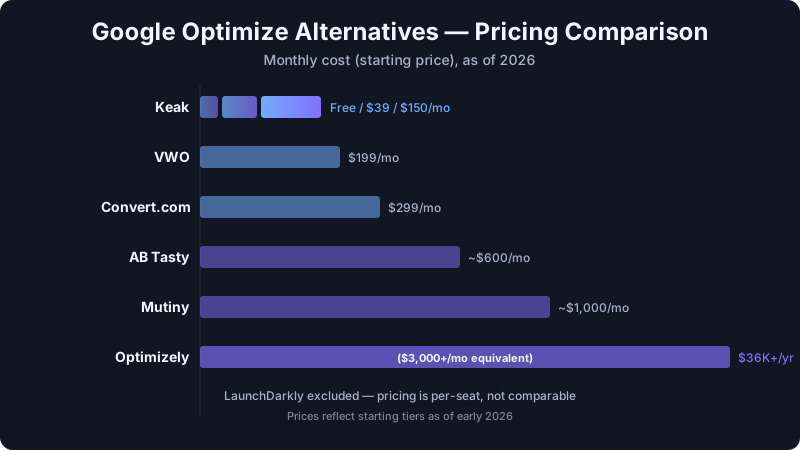
- Starter: $39/mo (25K impressions)
- Pro: $150/mo (50K impressions)
- Enterprise: Custom
Pros:
- Fully autonomous testing with Auto Pilot mode — no manual intervention needed
- V3 engine trained on thousands of successful A/B tests
- SPRT-based statistics engine for faster, more reliable results
- Pixel is ~34KB gzipped, loads async, within 10ms of baseline (no speed impact)
- Free plan is genuinely usable, not a teaser
- 1.37M+ variations created across the platform
Cons:
- Focused on front-end website optimization (not server-side feature flags)
- Newer brand compared to legacy enterprise players
Best for: Marketing teams and business owners who want results without becoming A/B testing experts. If you liked Optimize's simplicity but wished it did more of the work for you, Keak is the upgrade.
2. VWO — Best for Visual Editing and Heatmaps
VWO (Visual Website Optimizer) has been around since 2010 and offers a mature A/B testing platform with a strong visual editor. It bundles testing with heatmaps, session recordings, and surveys — making it a broader optimization suite.
Pricing: Starts at $199/mo for the Testing product. Full suite pricing climbs quickly. Free trial available but no permanent free tier.
Pros:
- Excellent WYSIWYG editor for creating variants without code
- Built-in heatmaps and session recordings
- Mature platform with extensive documentation
- Server-side testing available
Cons:
- Expensive for small teams ($199/mo minimum)
- Can be complex to configure — steeper learning curve than Optimize
- No AI-generated variations — you still create every variant manually
- Page load impact is heavier than lighter alternatives
Best for: Mid-market teams that want testing, heatmaps, and user research in one platform and have the budget to support it.
3. Optimizely — Best for Enterprise Feature Flags
Optimizely is the enterprise standard for experimentation. Post-acquisition by Episerver (now Optimizely), the platform has expanded far beyond A/B testing into content management, commerce, and feature flagging. For a deeper analysis, see our Keak vs. Optimizely comparison.
Pricing: Custom quotes only. Expect $36,000-$150,000+/year depending on traffic and modules. No free tier. No self-serve pricing.
Pros:
- Industry-leading statistical engine (Stats Engine)
- Full feature flagging and progressive delivery
- Server-side and full-stack experimentation
- Massive integration ecosystem
Cons:
- Pricing is prohibitive for most teams — this is strictly enterprise
- Complex implementation requiring dedicated engineering resources
- Overkill for teams that just need front-end A/B testing
- Long sales cycles and contract commitments
Best for: Enterprise companies with dedicated experimentation teams, complex product development workflows, and six-figure optimization budgets.
4. AB Tasty — Best for Personalization
AB Tasty combines A/B testing with AI-driven personalization, targeting, and product recommendations. It's popular with European e-commerce brands and mid-market companies that want testing plus audience segmentation.
Pricing: Starts around $600/mo. Custom pricing based on traffic. No free tier.
Pros:
- Strong personalization and audience targeting features
- Widget library for quick social proof, urgency timers, etc.
- Good visual editor
- AI-powered traffic allocation
Cons:
- Minimum pricing is steep for smaller teams
- Personalization features can overlap with (and complicate) your existing martech stack
- Testing capabilities alone don't justify the price vs. focused tools
- Support response times vary by tier
Best for: E-commerce brands that want to combine A/B testing with on-site personalization in a single platform.
5. Convert.com — Best for Privacy-Focused Teams
Convert.com has carved out a niche as the privacy-first A/B testing tool. It's GDPR, CCPA, and HIPAA compliant out of the box, with no personal data storage. For teams in regulated industries or those with strict data policies, Convert is a strong Optimize replacement.
Pricing: Starts at $299/mo (50K visitors). No free tier, but a 15-day free trial is available.
Pros:
- Best-in-class privacy compliance (cookieless tracking available)
- Clean, functional visual editor
- Integrates well with GA4, Shopify, WordPress
- Responsive support and onboarding
Cons:
- Higher starting price than several alternatives
- Smaller feature set compared to full-suite platforms like VWO
- No AI-generated test variations
- Limited personalization features
Best for: Companies in healthcare, finance, or the EU that need strict privacy compliance without sacrificing testing capability.
6. LaunchDarkly — Best for Developer-Focused Feature Flags
LaunchDarkly is not a traditional A/B testing tool — it's a feature management platform that enables progressive rollouts, feature flags, and server-side experimentation. It's included here because many teams used Google Optimize for basic feature toggling and need a developer-focused replacement.
Pricing: Free tier for up to 1,000 monthly active users. Pro starts at $10/seat/mo. Enterprise pricing is custom.
Pros:
- Best-in-class feature flag management
- SDK support for virtually every language and framework
- Granular targeting and segmentation
- Strong DevOps and CI/CD integrations
Cons:
- Not designed for marketing A/B testing — no visual editor
- Requires developer implementation for every experiment
- No front-end variation generation
- Experimentation features are secondary to feature management
Best for: Engineering teams that need feature flags and progressive rollouts, not marketing teams that need visual A/B testing.
7. Mutiny — Best for B2B Personalization
Mutiny focuses specifically on B2B website personalization — changing headlines, CTAs, and content based on visitor company, industry, or firmographic data. It's less of a traditional A/B testing tool and more of a personalization engine with testing built in.
Pricing: Custom pricing. Typically starts at $1,000+/mo. No free tier.
Pros:
- Purpose-built for B2B demand generation
- Integrates with Clearbit, 6sense, and other ABM platforms
- AI-powered content suggestions
- Strong playbook library for common B2B use cases
Cons:
- Expensive and narrowly focused on B2B
- Not suitable for e-commerce or B2C use cases
- Limited A/B testing depth compared to dedicated testing platforms
- Requires firmographic data enrichment tools to unlock full value
Best for: B2B SaaS companies running ABM campaigns that want to personalize website experiences by account or industry segment.
Comparison Table: Google Optimize Alternatives at a Glance
| Feature | Keak | VWO | Optimizely | AB Tasty | Convert | LaunchDarkly | Mutiny |
|---|---|---|---|---|---|---|---|
| Starting Price | Free | $199/mo | Custom ($36K+/yr) | ~$600/mo | $299/mo | Free (limited) | ~$1,000/mo |
| Free Plan | Yes (10K impressions) | No | No | No | No | Yes (1K MAU) | No |
| Visual Editor | Via extension | Yes | Yes | Yes | Yes | No | Yes |
| AI-Generated Variations | Yes (autonomous) | No | No | Limited | No | No | Limited |
| Auto Pilot Mode | Yes | No | No | No | No | No | No |
| No-Code Setup | Yes (Chrome ext.) | Partial | No | Partial | Partial | No | Partial |
| Statistical Method | SPRT | Bayesian | Stats Engine | Bayesian | Frequentist | Bayesian | Bayesian |
| Server-Side Testing | No | Yes | Yes | Yes | Yes | Yes | No |
| Personalization | Via AI variations | Heatmaps/surveys | Limited | Yes | No | Targeting | Yes (B2B) |
| Best For | SMBs to mid-market | Mid-market | Enterprise | E-commerce | Privacy-first | Engineering | B2B SaaS |
Which Google Optimize Alternative Is Right for You?
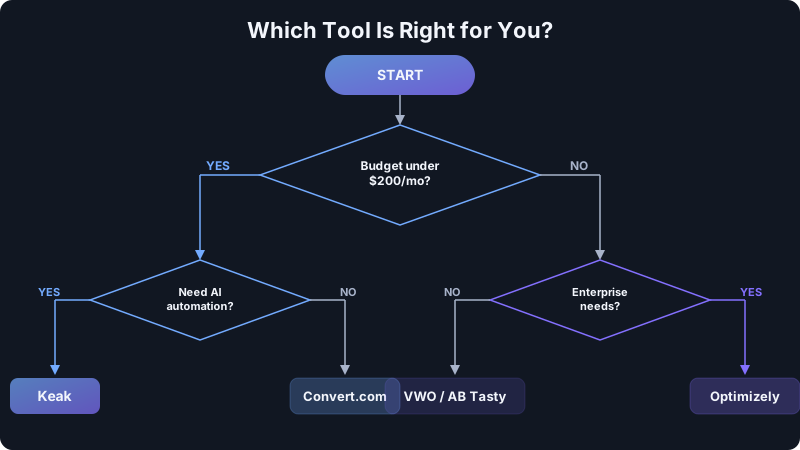
The answer depends on your team, budget, and what you actually need:
You want the closest thing to "set it and forget it"
Choose Keak. Its Auto Pilot mode and AI-generated variations mean you don't need to manually create tests or interpret results. Install the browser extension, point it at your site, and the AI agent handles the rest. With a free plan that includes unlimited tests, there's no reason not to try it.
You want a full optimization suite with heatmaps
Choose VWO. If you need heatmaps, session recordings, and surveys alongside A/B testing, VWO bundles them together. Budget $200+/mo and expect a longer onboarding process.
You're an enterprise with a dedicated experimentation team
Choose Optimizely. It's the market leader for complex, large-scale experimentation programs. Just be prepared for enterprise pricing and implementation timelines.
You need strict privacy compliance
Choose Convert.com. If GDPR, HIPAA, or CCPA compliance is non-negotiable and you need built-in cookieless tracking, Convert is purpose-built for this.
You're a B2B company running ABM campaigns
Choose Mutiny. Its firmographic personalization is unmatched for B2B demand generation, though you'll need a healthy budget and existing ABM infrastructure.
You're a developer who needs feature flags, not marketing tests
Choose LaunchDarkly. It's the best feature management platform on the market, but it's not an A/B testing tool for marketers.
How to Migrate from Google Optimize
If you're migrating late — or switching from whatever you rushed into in 2023 — here's the process:
- Export your historical data. If you saved Optimize experiment results, document your past winners and learnings.
- Audit your current tests. List every active experiment, its hypothesis, and its metrics.
- Choose your replacement using the framework above.
- Remove the old Optimize snippet from your site if it's still there (it's dead code now).
- Install the new tool. With Keak, this takes under 2 minutes via the Chrome extension. Other tools may require tag manager configuration or code deployment.
- Recreate priority tests first. Start with your highest-traffic pages and most impactful experiments.
- Let AI handle the rest. If you choose a platform like Keak with AI-driven testing, the system generates and launches new variations automatically.
FAQ
Is there a free alternative to Google Optimize?
Yes. Keak offers a free plan with 10,000 impressions per month and unlimited tests — making it the most capable free A/B testing tool available in 2026. LaunchDarkly also has a free tier, but it's focused on feature flags rather than marketing A/B testing.
What happened to Google Optimize?
Google sunset Google Optimize and Optimize 360 on September 30, 2023. Google stated it would integrate experimentation features into Google Analytics 4, but as of 2026, GA4's built-in testing capabilities remain extremely limited compared to dedicated A/B testing platforms.
Can I still use Google Optimize in 2026?
No. Google Optimize stopped serving experiments on September 30, 2023. Any Optimize code still on your website is dead code and should be removed. You need a third-party A/B testing tool to run experiments.
Which Google Optimize alternative is easiest to set up?
Keak is the easiest to set up — install the Chrome browser extension and you're running tests within minutes. No tracking scripts, no code changes, no developer required. VWO and Convert also offer visual editors, but they require more initial configuration.
Do I need a developer to switch from Google Optimize?
Not necessarily. Tools like Keak work entirely through a browser extension with no code changes required. They're compatible with Shopify, WordPress, Webflow, Framer, Squarespace, and virtually any website. Enterprise tools like Optimizely and LaunchDarkly typically do require developer involvement for implementation.