

How to A/B Test Your Shopify Store (No Code Required)
Learn how to A/B test your Shopify store without writing code. Boost your Shopify conversion rate with proven tests for product pages, CTAs, and more.

How to A/B Test Your Shopify Store (No Code Required)
Shopify A/B testing is the fastest way to stop guessing what your customers want and start knowing. Most Shopify stores leave 20-30% of their revenue on the table because they never test what actually converts — and the ones that do test often get tangled in code, broken themes, and unreliable data.
Shopify A/B testing is the process of showing two or more variations of a page element — such as a headline, product image, CTA button, or layout — to different segments of your store's traffic, then measuring which version drives more purchases, add-to-carts, or other conversion goals.
Here's the good news: you don't need a developer. You don't need to touch your theme code. And you can have your first test running in under five minutes. This guide walks you through everything — from choosing what to test to calculating the ROI of your results.
Why A/B Testing Matters for Shopify Stores
The average Shopify store converts at 1.4%. Top-performing stores hit 3.2% or higher. That gap represents tens of thousands of dollars in lost revenue for most merchants.
A/B testing closes that gap methodically. Instead of redesigning your entire store based on a hunch, you test one change at a time and let your actual customers tell you what works.
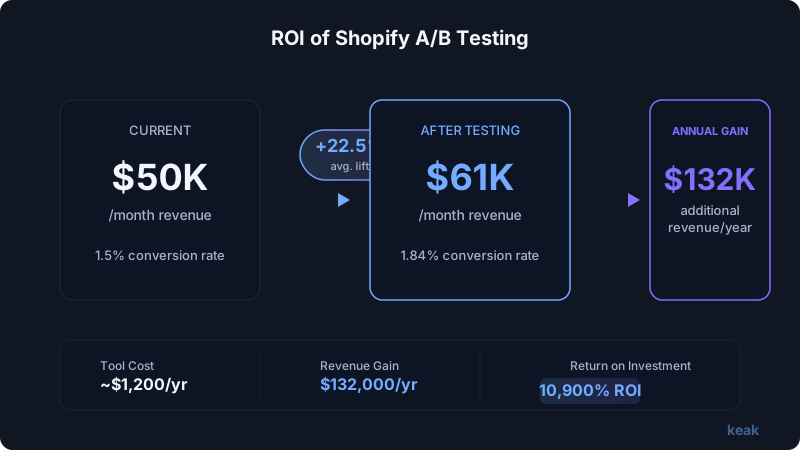
The math is simple. If your store does $50,000/month at a 1.5% conversion rate, improving that to 1.8% — a modest 20% lift — adds $10,000/month in revenue. That's $120,000/year from changes that might take minutes to implement.
Shopify stores that run consistent A/B tests see compounding improvements. Each winning test builds on the last. Platforms like Keak report an average 22.5% conversion rate increase within just two weeks of testing — and that's across all website types, not just e-commerce.
The brands winning in e-commerce aren't the ones with the biggest budgets. They're the ones learning fastest from their own data.
What You Can A/B Test on Shopify
Almost every element on your Shopify store is testable. Here are the highest-impact areas, ranked by typical conversion lift potential.
Product Pages
Product pages are where buying decisions happen. Test these elements first:
- Product titles and descriptions — Try benefit-driven copy vs. feature-focused copy
- Product images — Lifestyle shots vs. white background, image order, number of images
- Price display and formatting — Showing savings, compare-at pricing, price anchoring
- Add-to-cart button — Color, size, text ("Add to Cart" vs. "Buy Now" vs. "Get Yours")
- Social proof placement — Review stars above or below the fold, review count visibility
- Trust badges — Placement, style, which badges to show
Homepage
Your homepage sets the tone. Test:
- Hero section — Headline, subheadline, hero image or video, CTA button
- Value proposition — What you lead with and how you frame it
- Featured products — Which products, how many, grid vs. carousel
- Navigation structure — Menu labels, category organization
Collection Pages
Collection pages are underrated conversion levers:
- Product grid layout — 3-column vs. 4-column, card size
- Sorting defaults — Best selling vs. newest vs. price
- Filter visibility — Sidebar vs. top bar, which filters to show
- Product card content — Show price, reviews, quick-add buttons
CTAs and Microcopy
Small text changes deliver outsized results:
- Button copy — Action-oriented vs. benefit-oriented
- Urgency elements — Stock counters, shipping deadlines
- Free shipping thresholds — Display and messaging
- Cart page messaging — Upsells, cross-sells, trust reinforcement
Checkout and Post-Purchase
Shopify's checkout has limitations (more on that below), but you can still test:
- Cart page layout before checkout
- Post-purchase upsell offers
- Thank-you page content
Step-by-Step: Setting Up Shopify A/B Testing with Keak (No Code)
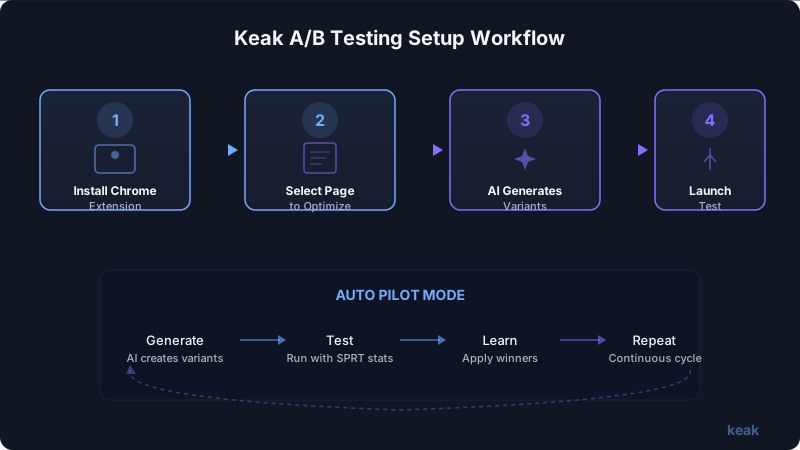
You don't need to install a Shopify app that slows down your store or injects scripts into your theme. Here's how to start testing in minutes with a browser extension approach.
Step 1: Install the Keak Chrome Extension
Head to the Chrome Web Store and install the Keak browser extension. No tracking scripts get added to your Shopify store. No code changes. No theme modifications. The extension works as an overlay — your store's performance stays untouched.
Technical note: Keak's pixel is approximately 34KB gzipped, loads asynchronously, and adds less than 10ms to your page load — well within Shopify's performance thresholds.
Step 2: Navigate to the Page You Want to Test
Open your Shopify store in Chrome. Go to the specific product page, collection page, or homepage you want to optimize. The Keak extension activates automatically on your domain.
Step 3: Select the Element to Test
Click the element you want to test — a headline, button, image, or section. The extension highlights it and opens the variation editor. No CSS selectors to write. No code to paste.
Step 4: Create Variations (or Let AI Do It)
You have two options:
- Manual: Write your own variation text, upload alternative images, or adjust styling
- Auto Pilot mode: Let Keak's AI agent generate variations for you based on its V3 engine, a machine learning model trained on thousands of successful A/B tests
Auto Pilot is particularly powerful for Shopify stores because it understands e-commerce conversion patterns — what types of headlines, CTAs, and layouts tend to win in retail contexts.
Step 5: Launch and Wait for Statistical Significance
Hit launch. Keak uses an SPRT-based statistics engine (Sequential Probability Ratio Test) to determine when results are reliable — not just when a certain number of visitors have seen the test. This means you get results faster without sacrificing accuracy.
Step 6: Review Results and Apply Winners
Once a test reaches significance, you'll see clear data on which variation won and by how much. Apply the winner and move on to your next test.
With Auto Pilot, this entire cycle — generate, test, learn, repeat — runs without your intervention. You check in when you want, and the system keeps optimizing.
10 High-Impact Shopify A/B Tests to Run First
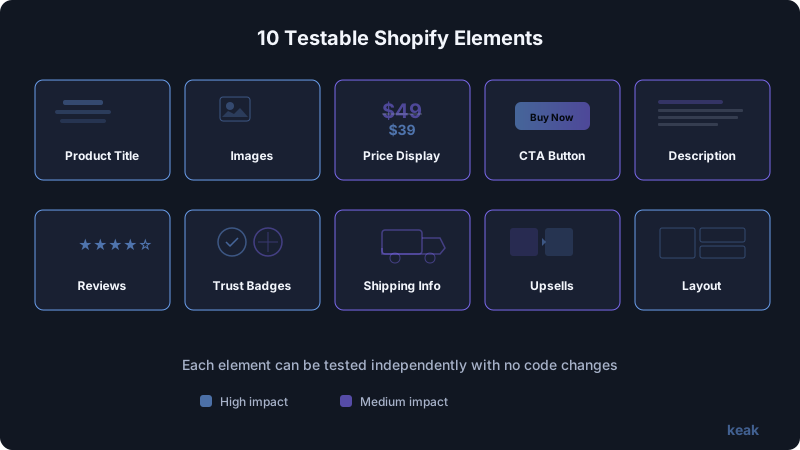
Start with the tests most likely to move the needle. These are based on patterns from over 1.37 million variations tested across e-commerce and other sites.
1. Add-to-Cart Button Color and Text
This is the classic first test for a reason. Change "Add to Cart" to "Get Yours Today" or "Buy Now — Free Shipping." Test high-contrast colors. Expected lift: 5-15%.
2. Product Page Hero Image
Test your main product image. Try a lifestyle image vs. a studio shot. Test showing the product in use vs. on a white background. For fashion, test model vs. flat lay.
3. Headline on Your Homepage
Your homepage headline is the first thing visitors read. Test benefit-driven ("Sleep Better Tonight") vs. product-driven ("Premium Memory Foam Mattress"). Expected lift: 10-25%.
4. Price Presentation
Test showing the original price crossed out next to the sale price vs. showing only the sale price. Test adding "per unit" breakdowns for bundles. Small formatting changes here can shift perceived value dramatically.
5. Social Proof Placement
Move your review stars above the product title instead of below. Test showing "X people bought this today" near the add-to-cart button. Social proof near the point of action typically outperforms social proof at the top of the page.
6. Free Shipping Threshold Messaging
If you offer free shipping at $50, test different ways to communicate that — a banner at the top, a message on the product page, a progress bar in the cart. Test the threshold amount itself if your margins allow.
7. Product Description Format
Test long-form descriptions vs. bullet points. Test tabs vs. accordion vs. full-page scroll. Test leading with benefits vs. leading with specs.
8. Collection Page Grid Layout
Switch between 3-column and 4-column grids. Test adding quick-view or quick-add buttons. Test showing vs. hiding prices on collection pages. According to conversion rate benchmarks, even small layout changes on high-traffic pages compound quickly.
9. Mobile Navigation
Over 70% of Shopify traffic is mobile. Test your mobile menu structure — hamburger vs. bottom navigation, category labels, search bar prominence. Mobile-specific tests often yield the biggest lifts.
10. Urgency and Scarcity Elements
Test adding "Only X left in stock" labels. Test countdown timers for sales. Test "Selling fast" badges. Be honest — manufactured urgency backfires — but legitimate scarcity signals consistently boost conversions.
Shopify-Specific Challenges (and How to Handle Them)
Shopify is powerful, but it introduces testing constraints you won't find on custom-built sites.
Theme Constraints
Shopify themes use Liquid templates, and many elements are deeply nested in theme code. Traditional A/B testing tools require you to edit theme files or inject custom JavaScript — both of which risk breaking your theme, especially after updates.
The workaround: Use a browser extension approach like Keak that works as a visual overlay rather than modifying your theme code. Your theme stays clean, and tests don't break when Shopify or your theme pushes updates.
App Conflicts
If you're running review apps, upsell apps, pop-up tools, and loyalty programs, adding another JavaScript-heavy testing app can cause conflicts. Scripts loading in the wrong order, CSS clashing, or functionality breaking — it's a real problem.
The workaround: Choose testing tools that minimize their JavaScript footprint. Keak's extension model avoids most app conflicts because it doesn't inject a heavy script into your store's codebase.
Checkout Limitations
Shopify restricts checkout customization to Shopify Plus merchants. If you're on a standard plan, you can't A/B test the checkout flow directly. This is Shopify's most significant testing limitation.
The workaround: Focus on pre-checkout optimization. Test your cart page, product pages, and the journey leading to checkout. Often, the biggest conversion gains happen before a customer ever reaches checkout. Also test landing page elements that drive traffic into your funnel.
Speed Concerns
Every script you add to Shopify affects your Core Web Vitals, which impacts both SEO and user experience. Many traditional A/B testing tools add 100-500KB of JavaScript and cause visible page flicker.
The workaround: Prioritize lightweight tools. Sub-50KB payloads with async loading are the standard you should demand.
How to Measure Results and Calculate ROI
Running tests is only valuable if you measure correctly.
Key Metrics to Track
- Conversion rate — The percentage of visitors who complete a purchase
- Revenue per visitor (RPV) — Total revenue divided by total visitors. More reliable than conversion rate alone because it accounts for order value
- Add-to-cart rate — A leading indicator, especially for product page tests
- Bounce rate — For homepage and landing page tests
- Average order value (AOV) — For pricing and upsell tests
Calculating Your Testing ROI
Here's a simple framework:
- Baseline monthly revenue: $50,000
- Conversion rate improvement from testing: 20% (conservative based on consistent testing)
- Additional monthly revenue: $10,000
- Annual revenue gain: $120,000
- Cost of testing tool: $39-$150/month ($468-$1,800/year)
- ROI: 6,567% - 25,541%
Even a single winning test can pay for years of a testing tool subscription. The compounding effect of multiple wins makes the math even more dramatic.
Statistical Rigor Matters
Don't call tests early. Wait for statistical significance — ideally 95% confidence or higher. Tools with SPRT-based engines (like Keak) handle this automatically, so you don't have to do the math yourself or risk acting on noise.
Running a test for "a few days" and picking the winner is worse than not testing at all. It gives you false confidence in bad data.
Tools Comparison for Shopify A/B Testing
Here's how the main options stack up for Shopify store owners.
| Feature | Keak | Google Optimize (Sunset) | VWO | Optimizely | Neat A/B Testing |
|---|---|---|---|---|---|
| No-code setup | Yes (Chrome extension) | N/A (discontinued) | Partial | No | Yes (Shopify app) |
| Shopify-specific | Works on any site including Shopify | N/A | No | No | Shopify only |
| AI-generated variations | Yes (Auto Pilot) | No | No | Limited | No |
| Auto-runs tests | Yes | No | No | No | No |
| Page speed impact | Minimal (~34KB) | N/A | Moderate | Heavy | Moderate |
| Free plan | Yes (10K impressions) | N/A | No | No | Limited |
| Statistical engine | SPRT-based | N/A | Bayesian | Frequentist | Basic |
For most Shopify store owners — especially those without developer resources — the deciding factors are ease of setup, speed impact, and whether the tool can run tests autonomously. If you're evaluating options, our comparison of the best A/B testing tools for small business goes deeper.
Getting Started Today
You don't need a perfect strategy to start. Pick your highest-traffic product page. Test one element — the headline, the main image, or the add-to-cart button. Let the data tell you what to do next.
The Shopify stores pulling ahead right now aren't doing anything magical. They're testing consistently, learning from results, and compounding small wins into significant revenue gains.
Your store has the traffic. Your customers are already telling you what they want through their behavior. A/B testing is how you listen.
FAQ
How much traffic do I need to A/B test my Shopify store?
You need enough traffic to reach statistical significance in a reasonable timeframe. As a general rule, 1,000 visitors per variation per week is a solid starting point. If your store gets fewer than 500 visitors per week, focus on higher-level tests (homepage headline, main CTA) rather than granular tests (button color, font size). Low-traffic stores should test elements on their highest-traffic pages first to get results faster.
Will A/B testing slow down my Shopify store?
It depends on the tool. Traditional A/B testing apps that inject heavy JavaScript into your theme can add 100-500ms to your page load and cause visible flickering. Lightweight solutions that load asynchronously with minimal payloads (under 50KB) have negligible impact. Always check your Core Web Vitals before and after installing any testing tool.
Can I A/B test Shopify checkout?
Only if you're on Shopify Plus, which gives you access to checkout customization through checkout extensibility. Standard Shopify plans lock down the checkout experience. However, you can still test everything leading up to checkout — product pages, cart pages, navigation, and CTAs — which is where most conversion improvements happen anyway.
How long should I run a Shopify A/B test?
Run each test until it reaches statistical significance, not for a fixed number of days. This typically takes 1-4 weeks depending on your traffic volume and the size of the conversion difference between variations. Never end a test early because one variation "looks like it's winning." Tools with proper statistical engines will tell you when results are reliable. Also run tests for at least one full business cycle (typically one week) to account for day-of-week variations in shopping behavior.
What's the first A/B test I should run on my Shopify store?
Start with your product page add-to-cart button — specifically the button text and color. It's high-impact, easy to test, and gives you fast results because it directly affects your most important conversion action. After that, move to your product page headline, then your homepage hero section. Prioritize elements that every visitor sees and that directly influence purchasing decisions.